
Download Orbis – Free Weather App for Mac, Secure Updates, Full‑Version Tool
Overview of Orbis for macOS
Orbis, formerly known as MenuWeather, is a polished weather‑monitoring application designed exclusively for macOS. Developed by Evan Coleman, the app delivers real‑time meteorological data right from your menu bar, keeping you informed without the need to open a separate browser window or launch a bulky program. The latest release, version 5.0.1, brings a refreshed UI, smoother animations, and more accurate forecasts sourced from reliable weather APIs.
Although the Softonic catalog notes that the OS requirements are not explicitly listed, the app is built for modern macOS environments and runs natively in English. Orbis aims to replace generic desktop widgets with a dedicated, secure, and customizable weather tool that blends seamlessly with the Apple aesthetic. Whether you’re a remote worker tracking temperature changes for outdoor meetings, a traveler needing quick climate checks before a flight, or simply a Mac enthusiast who loves sleek utilities, Orbis offers a full‑featured experience without the clutter of ads or hidden fees.
The application’s “full version” label indicates that all premium features—such as multi‑city tracking, detailed hourly forecasts, and alert notifications—are unlocked immediately after download, eliminating the need for in‑app purchases. In short, Orbis provides a dedicated, low‑resource weather solution that respects macOS design principles while delivering the data you need at a glance.
Key Features That Set Orbis Apart
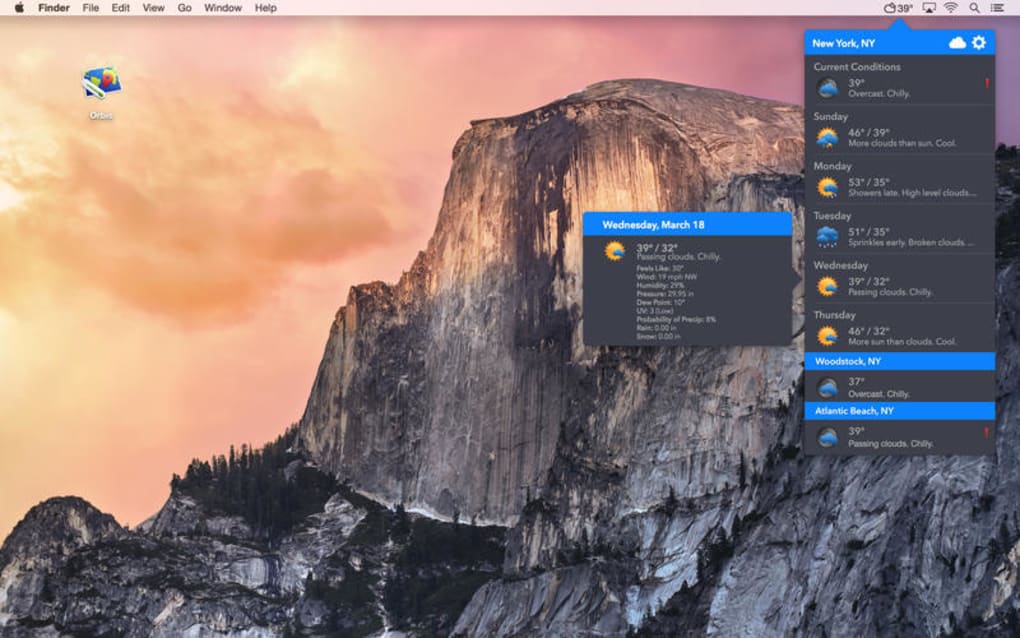
- Menu‑Bar Integration: Displays current temperature, weather condition icons, and short forecasts directly in the macOS menu bar.
- Multi‑City Support: Add up to ten locations and switch between them with a single click.
- Hourly & 10‑Day Forecasts: Detailed charts for temperature, precipitation probability, wind speed, and humidity.
- Customizable Alerts: Receive notifications for severe weather, temperature thresholds, or sunrise/sunset times.
- Dark Mode Compatibility: Automatically adapts to macOS appearance settings for a consistent look.
- Widgets & Notification Center: Optional widgets for macOS Big Sur and later, allowing glanceable data on the desktop.
- Data Sources: Powered by reputable weather APIs (e.g., OpenWeatherMap, Weatherbit) ensuring up‑to‑date information.
- Secure Updates: Automatic, signed updates delivered via the built‑in updater, reducing the risk of tampering.
- Low CPU & Memory Footprint: Optimized for minimal impact on system performance, ideal for older MacBooks.
- Localization: While currently English‑only, the UI is built with future translations in mind.
Beyond the bullet points, Orbis offers a set of thoughtful touches that enhance the overall user experience. The app’s preferences pane lets you select temperature units (Celsius or Fahrenheit), wind speed (km/h, mph, or m/s), and even the time format for forecasts. For power users, there’s an option to hide the menu‑bar icon and rely solely on the Notification Center widget, conserving screen real estate.
The design language follows Apple’s Human Interface Guidelines, ensuring crisp icons, smooth transitions, and proper use of translucency. Because Orbis is a full‑version product, there are no “premium upgrades” lurking behind a paywall; everything you see in the feature list is available right after installation. This transparency is a refreshing change in a market where many “free” utilities hide essential tools behind subscription models.
In practice, the app becomes a reliable companion for daily planning, whether you’re checking the likelihood of rain before a bike commute or monitoring temperature spikes for gardening.
Installation, First‑Run Usage, and Compatibility
Step‑by‑Step Installation Guide
- Visit the official Orbis download page or a trusted Mac software portal.
- Click the “Download Orbis” button; the file will be saved as
Orbis.dmg. - Open the DMG and drag the Orbis icon into your Applications folder.
- Launch the app from Launchpad or the Applications directory.
- The first time you open Orbis, macOS will display a security prompt. Click Open to allow the app to run.
- Orbis will request permission to send notifications. Grant this permission to enable weather alerts.
- Complete the initial setup wizard: select your primary location, choose temperature units, and decide whether the icon should appear in the menu bar.
After these steps, Orbis will automatically fetch the latest weather data and populate the menu‑bar icon. The built‑in updater checks for new releases once a day; if a newer version is available, you’ll see a discreet badge on the icon prompting you to install the update. Because the app is signed with a developer certificate, macOS verifies its integrity during each launch, ensuring a secure, tamper‑free experience.
Everyday Usage Tips
Once Orbis is running, you can interact with it in several intuitive ways. Clicking the menu‑bar icon reveals a pop‑over window with a quick summary of the current conditions, a list of saved cities, and shortcut buttons for “Hourly Forecast” and “10‑Day Outlook.” To view a detailed forecast, simply click the desired city name; a new window slides open, offering interactive charts and a timeline view. For users who prefer a less intrusive presence, you can hide the menu‑bar icon via the Preferences pane and rely exclusively on the Notification Center widget, which can be added by right‑clicking the Notification Center and selecting “Edit Widgets → Weather → Orbis.” The widget displays the same real‑time data but in a compact card format that fits alongside other widgets like Calendar and Stocks.
System Compatibility
Orbis is built for macOS 10.12 (Sierra) and later, including the latest macOS Ventura and Sonoma releases. The application runs natively on Intel‑based Macs as well as Apple Silicon (M1, M2, and later) thanks to universal binary packaging. Minimum hardware requirements are modest: 512 MB of RAM and 50 MB of free disk space. Because the app is lightweight, it operates smoothly even on older MacBook Air models from 2015 onward. Users on macOS versions earlier than 10.12 may encounter compatibility warnings, as the app leverages modern APIs for Dark Mode and Notification Center integration that are unavailable on legacy systems.
Pros, Cons, and Frequently Asked Questions
Pros
- Full‑version app with all features unlocked from day one.
- Seamless menu‑bar integration that respects macOS design language.
- Multi‑city support and detailed hourly/10‑day forecasts.
- Secure, automatic updates signed by the developer.
- Low CPU and memory usage, suitable for older Macs.
Cons
- Currently limited to English language only.
- No native Windows, Android, or iOS counterpart.
- Advanced customization (e.g., custom icons) is not available yet.
- Requires an internet connection for real‑time data; offline mode is minimal.
FAQ – Your Questions Answered
Is Orbis a free app or does it require a purchase?
Orbis is offered as a free full‑version download. All features are available without any hidden fees or in‑app purchases.
Can I use Orbis on a Mac that runs macOS Catalina?
Yes. Orbis supports macOS 10.12 (Sierra) and later, so Catalina (10.15) is fully compatible.
How does Orbis retrieve its weather data?
The app connects to reputable weather APIs such as OpenWeatherMap and Weatherbit, pulling data every 30 minutes to keep forecasts current.
Will Orbis drain my battery on a MacBook?
Because Orbis is optimized for low resource consumption, it typically uses less than 2 % CPU and a few megabytes of RAM, resulting in negligible impact on battery life.
Can I receive severe‑weather alerts from Orbis?
Yes. The Preferences panel includes an “Alerts” section where you can enable notifications for storms, high winds, frost, and other conditions based on your selected locations.
Conclusion – Why You Should Download Orbis Today
Orbis delivers a clean, reliable, and fully unlocked weather experience for macOS users who value both aesthetics and functionality. Its menu‑bar presence ensures you never miss a temperature change, while the multi‑city support and detailed forecasts cater to power users who need more than just a glance. The app’s low footprint, automatic secure updates, and seamless Dark Mode integration make it feel native to the Apple ecosystem.
Although the language support is limited to English and there’s no cross‑platform version, the focused macOS implementation shines in its niche. If you’re looking for a free, ad‑free weather utility that respects your system resources and provides accurate data, Orbis is a solid choice. Download the installer now, follow the simple setup steps, and let Orbis keep you informed about the sky above—without the clutter of generic widgets.
Ready to enhance your Mac with a dedicated weather companion? Click here to download Orbis and start receiving real‑time forecasts instantly.







